Showing posts with label EMULATOR. Show all posts

Screen Shots


NEO.emu
Important Note: Make sure to use Neogeo zipped rom sets from a
recent MAME set like 0.144 and higher. Do not use sets from Neorage or FBA since they are not 100% compatible. Also do not unzip or rename any game files. Initial Setup:
Q: I'm stuck with 4 credits, how do I insert more? A: When in console (AES) mode, you can't insert more credits just like the real Neogeo system. If you push start+select to access the Universe BIOS menu, most games have infinite life/credit cheats listed. Alternatively, to switch into arcade (MVS) mode: open the app menu, change the setting under Unibios Switches, and reset the game. Now push the select button to insert as many credits as you like. Compatibility List (All sets were tested from MAME 0.144, larger ones require devices with at least 512MB of memory):
Note: No current ports use the C core so all issues with it are now marked "OK"
Needed BIOS Files (number in parentheses is CRC-32): If you wish to remove unused files in your neogeo.zip, these are the exact files currently needed by NEO.emu
|


Features & Compatibility
ePSXe includes multiple video, audio and controls features.PSX games compatibility is very high. It supports Android tablets and smartphones and it includes optimized versions for ARM and Intel devices.Requirements
Minimum system requirements:
Android 2.2 Froyo
ARMv7 or X86
800Mhz
256 MB of RAM
Multi touch screen support or hw keys or external gamepad
Recommended system configuration:
Android 2.3/4.X
ARMv7 with Neon or X86!!
+1200Mhz dual core
Fast GPU card with good OpenGL support
512 MB of RAM
Fast and big sdcard
Multi touch screen support or hw keys or external gamepad
Android 2.2 Froyo
ARMv7 or X86
800Mhz
256 MB of RAM
Multi touch screen support or hw keys or external gamepad
Recommended system configuration:
Android 2.3/4.X
ARMv7 with Neon or X86!!
+1200Mhz dual core
Fast GPU card with good OpenGL support
512 MB of RAM
Fast and big sdcard
Multi touch screen support or hw keys or external gamepad
Video orientation & aspect ratio
 Landscape mode. Supporting multiple digital/analog/gun configurable touchscreen gamepad skins.
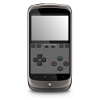 Portrait mode. Including a pretty touchscreen gamepad skin on the bottom of the screen.
 Full screen. You can choose 4:3 or stretched full screen ratio. You can also remove the top/bottom blank bands on PAL games.
Video engine & filtering
 Hardware/Software gpu engine mode. Accurated and fast software based gpu, optimized with Neon instructions. Included a software mode for old legacy devices with bad opengl drivers.
 OpenGL HD graphics powered by Peopsxgl Plugin. Increase resolution of the games to your device resolution, including additional filtering options.
 Enable or disable filtering for people waiting to see the games how it was in the original PSX.
Audio Quality & Latency
ePSXe provides an very accurate audio engine supporting all PSX audio effects (volume, enveloping, reverb, noise, frecuency modulation, interpolation ...), and all of sound modes (PCM, XA and CDDA). Depending on your device speed, you can choose full audio effects (required in some games) or disable some audio effects to improve the emulation speed.ePSXe provides several modes to manage the audio latency between input/video and audio. By default epsxe uses a big audio buffer which provides more framerate and average speed emulation, but it can add extra audio latency. ePSXe includes some low latency modes, "low latency experimental mode 2" reduces the sound buffer in order to get a lower audio latency but requiring more cpu.
Controls and Input Modes
ePSXe supports up to 4 players on games supporting multitap. It is possible to control the game using the touchscreen, hardware keys (such as Xperia Play) or external gamepads (using OTG-USB wire or bluetooth).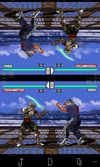 ePSXe includes a special 2 players mode using split screen technology, which is really fun on 7/10" tablets.
Touchscreen Controls
ePSXe provides several touchscreen skins supporting "digital" and "analog" controls. You can switch between digital and analog when choosing the DualShock mode using the swap mode button. The skin can also be hidden in order to play with hardware keys or external gamepads.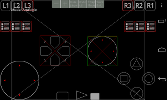 The touchscreen skin can be edited before playing. You can move, hide and resize the buttons on the skin. In the editor screen you can modify the "digital" and the "analog" skin to match your requirements.
ePSXe supports adding until 6 extra touchscreen buttons to map extra emulation options such as: "combo buttons" (2 buttons on 1), "sticky buttons", or special options (load/save states, enable/disable framelimit).
Bluetooth/USB gamepads and hardware buttons
ePSXe supports using hardware buttons in phones or tablets including it (such xperia play or Archos Gamepad), ePSXe can also be used with an external gamepad (using bluetooth or OTG-USB). It is possible to use the digital buttons, and it supports the analog sticks and shoulder triggers.ePSXe includes gamepad profiles for: Moga, Moga PRO, Sixaxis - PS3, Xperia Play, Nyko Gamepad PRO, IPega, Sixaxis, Xbox 360, Archos, Nvidia Shield and Ouya including mappings options which permits to map any kind of Android supported gamepads.
ePSXe supports mapping some buttons to additional functions such as save/load states, menu and enable/disable framelimit.
Cheats codes
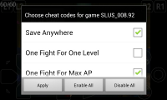 ePSXe supports Gameshark cheat codes builtin. In order to get the cheatcodes you can download list of cheatcodes and copy them on your device in the format defined in the configuration section, or you can use the in game option "download cheatcodes", which will access a big archive of cheatcodes provided by psxdatacenter.com.
Gamelist
The games must be provided by the users, you can dump your own games from your original CDROMs or getting them from shops such as eBay or Amazon to very low prices.ePSXe supports different game/iso formats. It supports: cue/bin, cue/multi-bin, img/ccd, mds/mdf, pbp, nrg, cdi, ecm and iso. ePSXe requires that the games are uncompressed on the sdcard (previously to detect and run the games), so you could need tools such as "7zipper".
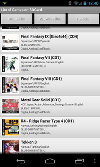 ePSXe includes a gamelist with cover art and game info support after scanning the sdcard and finding games (information and cover are downloaded from internet)
Multi-Disc games are supported, an option is available during gameplay which allows changing the disc.
Memcards and Savestates
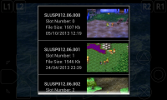 ePSXe supports saving savestates and memcards. It is fully compatible with ePSXe for Windows/Linux, so you can contine your games in your different devices.
It is recommended to do backup of your saved games (especially to the memcards which are shared by all of games).
ePSXe includes a "run bios" option which provides access to the PSX memory card editor that can be used to move and delete your memcard saves
Compatibility
ePSXe supports around 99% of the PSX games, including more than 5000 different games. In order to see an extensive list of supported games you can access : Some of the supported games are:- Final Fantasy VII/VIII/IX/Tactics
- Dragon warrior IV/VII
- Chrono Cross
- Megal Gear Solid
- Gran Turismo 1/2
- Tomb Raider 1/2/3/4
- Colin Mc Rae 1/2
- Crash Bandicoot 1/2/3
- Download Links :Link 1 Link 2 Link 3:Version 1.9.24 2014-10-29
Version 1.9.23 2014-10-28
Version 1.9.22 2014-10-27 - Link 4
Additional features
- Enable/Disable framelimit.
- Enable/Disable frameskip.
- PSX Bios autofinder.
- PPF patch support (for translations).
- Subchannel using sub/sbi formats.
- Libcrypt support.
- Show PSX logo during game boot.

Download free
- PSeMu3, Emulator PS3 For PC + Bios Plugin
- PSeMu3 1.3.3.9 - Emulator PS3 Link2 + BIOS
- Pass: airemulator
- Link 2 pass=www.fullypcgames.net

- Link 3 pass=www.muhammadniaz.net/
- Click Here


.jpg)

Xbox 360 Emulator 2.0 has been released with the following changes and fixes from previous versions:
* Few minor bug fixes
* Frames Per Second have been increased with reported Windows 7 64-bit
* Roms (Game ISO files) are region free since 1.5b

Below are the links available to download the XBOX 360 Emulator for PC’s:
System Requirements for the Xbox 360 Emulator:
Minimum:
OS: Windows XP, Vista or Windows 7
Processor: Core 2 Duo 2.4 GHz or Althon X2 2.7 GHz
RAM: 2GB
Graphic card: ATI Radeon 3870 or higher, Nvidia GeForce 8800 GT or higher.
Graphics card memory: 512 MB
Processor: Core 2 Duo 2.4 GHz or Althon X2 2.7 GHz
RAM: 2GB
Graphic card: ATI Radeon 3870 or higher, Nvidia GeForce 8800 GT or higher.
Graphics card memory: 512 MB
Recommended:
OS: Windows XP, Vista or Windows 7
Processor: Hexacore Intel or AMD CPU 3.33 gHz or higher.
RAM: 4GB
Graphic card: Nvidia GeForce GTX 560 or ATI Radeon 6950 or higher.
Graphics card memory: 1 GB
Processor: Hexacore Intel or AMD CPU 3.33 gHz or higher.
RAM: 4GB
Graphic card: Nvidia GeForce GTX 560 or ATI Radeon 6950 or higher.
Graphics card memory: 1 GB
Other Information regarding the Xbox 360 Emulator:
You can associate your ISO files in windows to open through the Xbox 360 Emulator by default, although I don’t recommend this because you might want to open ISO files in DVD writing software and to use in programs like Daemon Tools. Once you have the Xbox 360 Emulator running, you can select ‘File’ , then ‘Open’ and browse to your ISO game files to open and run the XBox 360 game right from within Windows.
The Xbox 360 Emulator has been tested under Windows XP SP3 but I would recommend a system with at least Windows Vista or Windows 7. It will run on systems with lower end graphics cards but you can expect frame loss. The Recommended and minimum information above will give you an idea of which hardware is ideal to run this Xbox Emulator.
The development of the emulator is ongoing and updates and patches are released at frequent intervals. The development team is also known for their great efforts in bringing our custom firmware and jailbreaks for various consoles and devices.
Under the Tools/Settings of the emulator, you can map keyboard keys to emulate the xbox controller, you can set up your current PC games controller (like logitech etc) or modify the mouse for game usage.
GameConsoleWorld does not endorse any form of piracy so please use this emulator for education purposes only and only use games that you have legally purchased. There are various ways to make ISO backups of your games and all the information can be found under the ‘Help’ section of the Xbox 360 Emulator.


.jpg)